

Britsino Casino Login – Account Help
This page walks through the Britsino casino login from the very first form to the most common error messages. It follows the order in which problems usually appear: creating the account, signing in, passing identity checks and, finally, fixing access when something goes wrong. The Britsino online casino login uses the same email and password on every device, so the steps below apply equally to a laptop and a phone.
Opening a Britsino Account
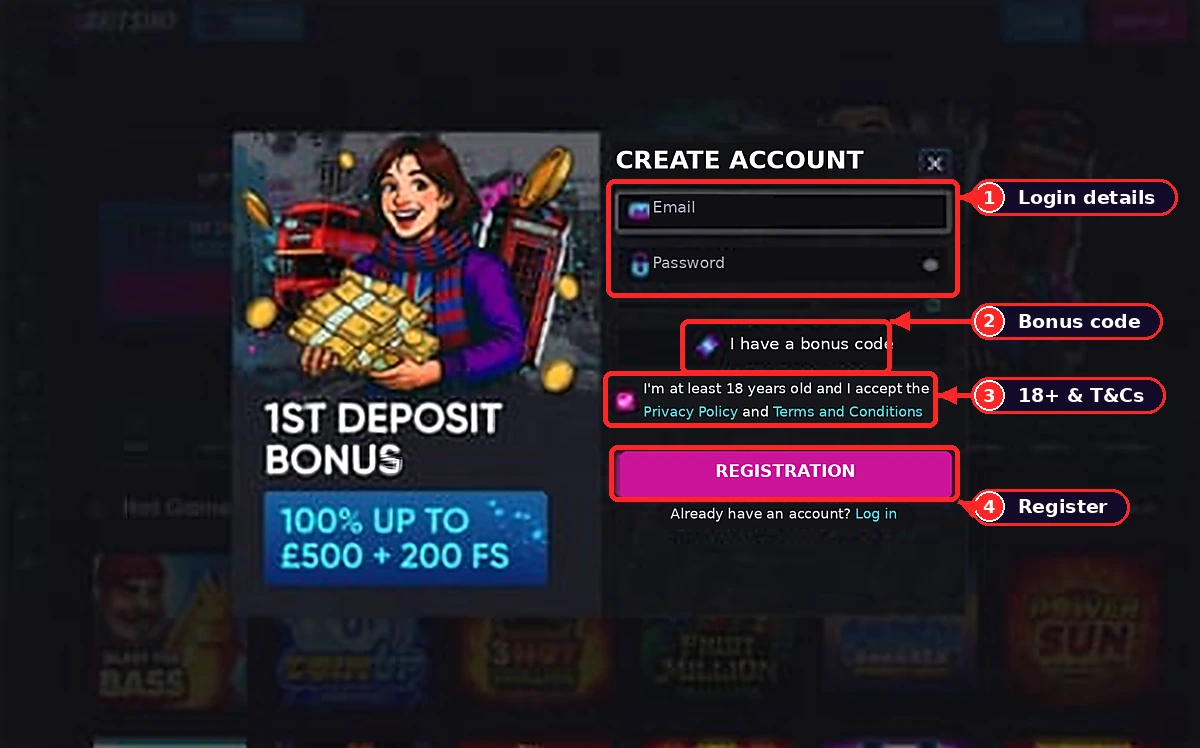
Registration starts with the sign-up button in the top right corner of the Britsino home page. The first form asks only for an email address and a password, with an optional bonus code field and a box confirming that you are 18 or over. Your full name, date of birth, home address and currency are added in the profile afterwards. Use your legal name exactly as it appears on your passport or other photo ID; a mismatch there is the most frequent reason for delays later.
Choose a password of at least ten characters that you do not use anywhere else. Tick the age and terms boxes only after reading the terms, particularly the one-account rule: Britsino allows a single account per person, household, IP address and device. Two accounts in the same home, even belonging to different adults, can both be closed. Confirmation usually arrives by email within minutes; if it does not, check the spam folder before requesting another link. Britsino only accepts players aged 18 and over, and the date of birth is checked against your documents later.
Signing In from Desktop and Phone
Once the account is confirmed, the sign-in itself takes three steps:
- Open the Britsino site and press the Log In button in the header.
- Enter the email address and password used at registration.
- Press Log In again; the balance appears in the header when the session has started.
On a phone the Log In button sits in the same place, and the browser can save your details if you allow it. Only do that on a personal device protected by a screen lock. Sessions end automatically after a period of inactivity, so an unexpected return to the login screen during a break is normal rather than a sign of a problem with the Britsino casino login.
Britsino Identity Checks Explained
Verification, often called KYC, is requested before the first withdrawal and sometimes earlier if a payment triggers a review. Britsino asks for three kinds of document: a photo ID (passport or national identity card, or another government-issued card with your photo), a proof of address dated within the last three months (a utility bill, council tax letter or bank statement) and, for some payment methods, proof that the card or wallet belongs to you.
Upload clear colour photos showing all four corners of each document. For a debit card, cover the middle six digits and the security code but leave the first six, the last four and your name visible. Britsino usually completes checks within one to three working days. Uploading everything straight after registration means the first cash-out is not held up waiting for paperwork.
When the Login Fails
Most access problems have simple causes. Work through this list before contacting Britsino support:
- Wrong password: check caps lock and keyboard language, then use the Forgot Password link; the reset email is valid for a limited time.
- No reset email: look in spam and promotions folders, and confirm you are using the address given at registration.
- Account locked: repeated failed attempts trigger a temporary lock; wait, then reset the password or ask live chat to unlock it.
- Page will not load: clear the browser cache, disable ad blockers for the site or try another browser.
- Account closed: this happens after a self-exclusion request or a breach of the one-account rule and cannot be fixed by a password reset.
If none of these applies, Britsino live chat is available 24 hours a day. Agents will ask security questions before discussing the account, so have your registration details ready. For persistent problems with the Britsino online casino login, a screenshot of the error message speeds things up considerably.
Britsino Account Security Habits
A few habits keep the account safe. Use a password manager rather than reusing a password, sign out on shared computers and never share login details, even with family. Be wary of emails or messages that ask you to confirm your password through a link: Britsino support never asks for your password, and pages imitating the login form exist.
Check the address bar before typing anything, and bookmark the address you trust. If you notice unfamiliar activity, change the password immediately and contact live chat so that Britsino can pause withdrawals while the account is reviewed.
Ready to see Britsino for yourself?18+ only. Terms apply. Play within a budget you can afford to lose.
Visit BritsinoFrequently Asked Questions
Can I use the same login on my phone?
Yes. The same email and password work in any mobile browser, and the session behaves exactly as on desktop.
Why was I logged out in the middle of a session?
Sessions end after a period of inactivity for security reasons. Log in again and your balance and bonus progress will be where you left them.
Do I need to verify before I can log in?
No. Verification is needed before the first withdrawal, not for signing in or depositing, though uploading documents early saves time.
Can my partner open an account at the same address?
The terms allow one account per household, so a second account at the same address risks both being closed.